Page health score and full SEO audit
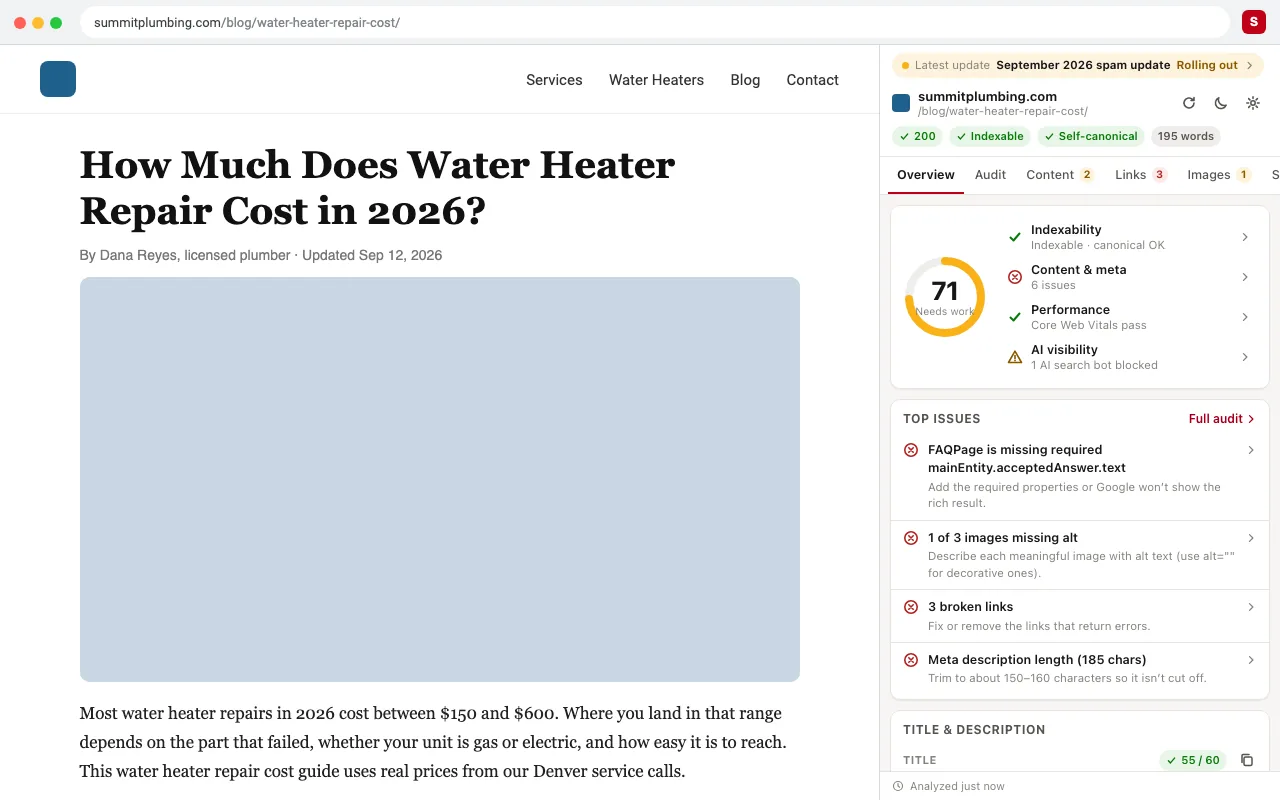
One score out of 100 for every page, with the top issues ranked by impact. Open the full audit to see every check, how much it counts, and exactly how to fix it.
Full-service SEO for Utah businesses ready to dominate local and national search. Strategy, execution, and reporting — all handled.
Custom Next.js and React Router v7 builds with Postgres databases and bespoke CMS — engineered with technical SEO from day one.
Free SEO Chrome extension · by RedSEO
SEO ToolBox opens in Chrome's side panel and stays there while you browse. It checks meta tags, headings, schema, links, indexability, AI crawler access and Core Web Vitals on every page, and ranks what to fix first.
No account. No paywall. Your data stays in your browser.
Built and used every day by the SEO team at RedSEO, on real client sites.
Most SEO extensions show you tags. SEO ToolBox tells you what's wrong, how much it matters, and where to fix it, without leaving the page you're on.
One score out of 100 for every page, with the top issues ranked by impact. Open the full audit to see every check, how much it counts, and exactly how to fix it.
Title and meta description lengths with a live Google preview. Canonical, meta robots, Open Graph and Twitter tags. Your H1–H6 outline flags skipped levels; click any heading to find it on the page.
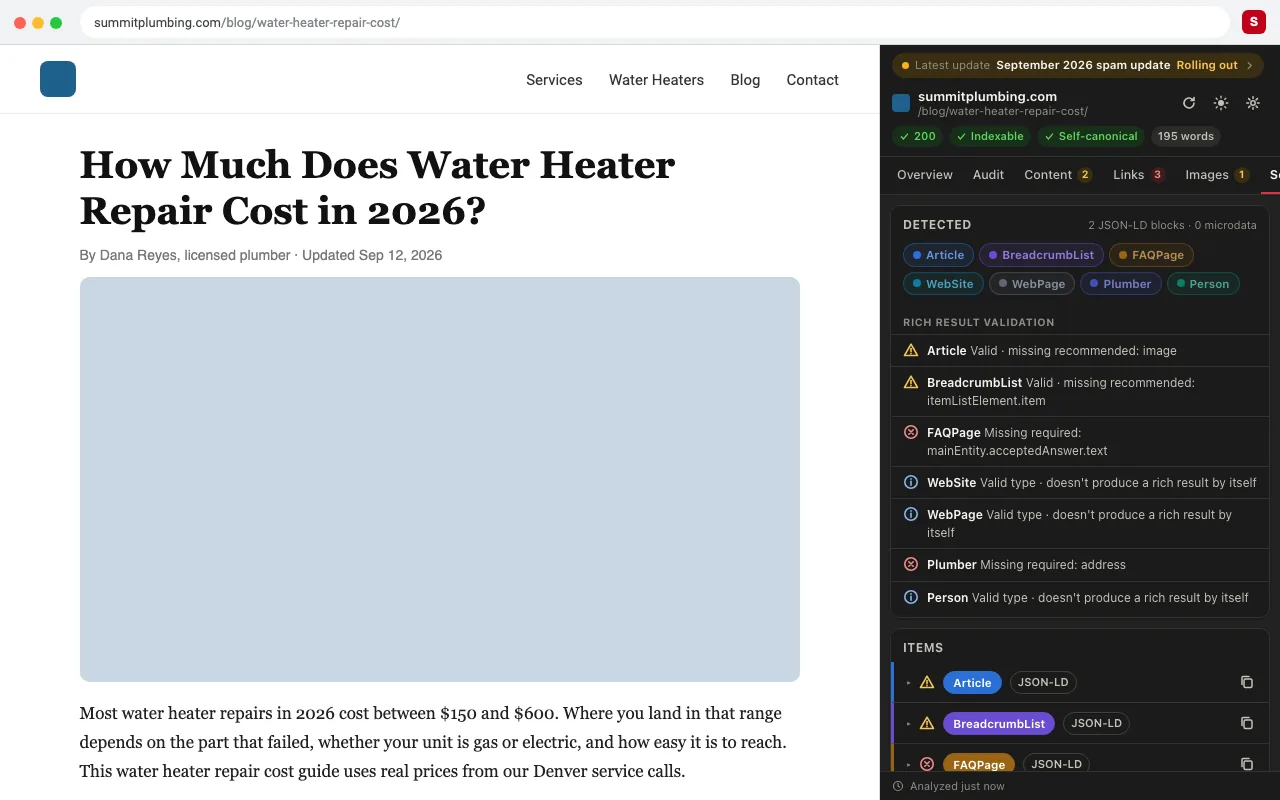
Reads JSON-LD and microdata, color-codes each type, and validates it against Google's rich result requirements for Article, Product, LocalBusiness, FAQ, Breadcrumb, Event, Recipe, Review, Video, Job posting and more. You see what's missing before Google does.
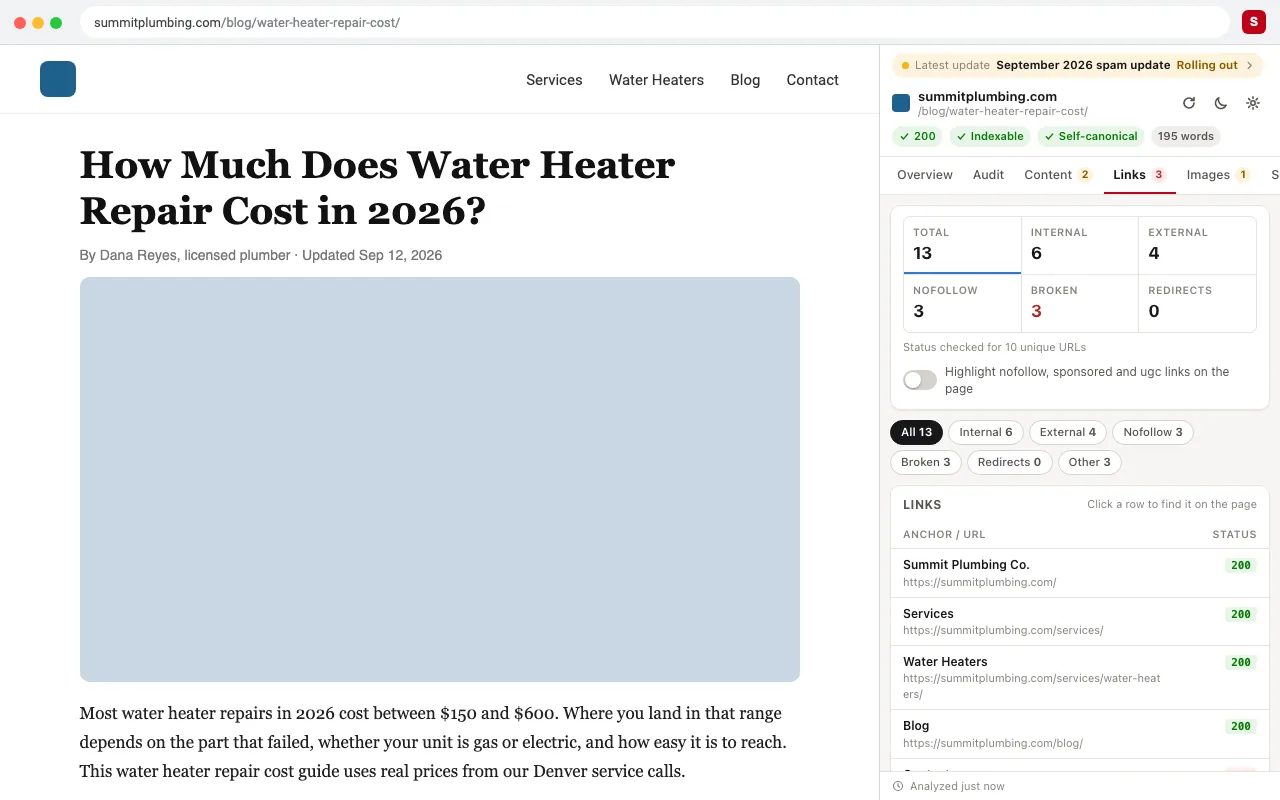
Live status codes for every internal and external link on the page. Redirect chains show 301s and 302s hop by hop. Nofollow, sponsored and UGC links are highlighted on the page. Export everything to CSV or copy it straight into a spreadsheet.
Indexability comes from meta robots, the X-Robots-Tag header and robots.txt together. When robots.txt blocks Googlebot, SEO ToolBox shows the exact line doing it. The XML sitemap check confirms the page is listed, including in sitemap index files.
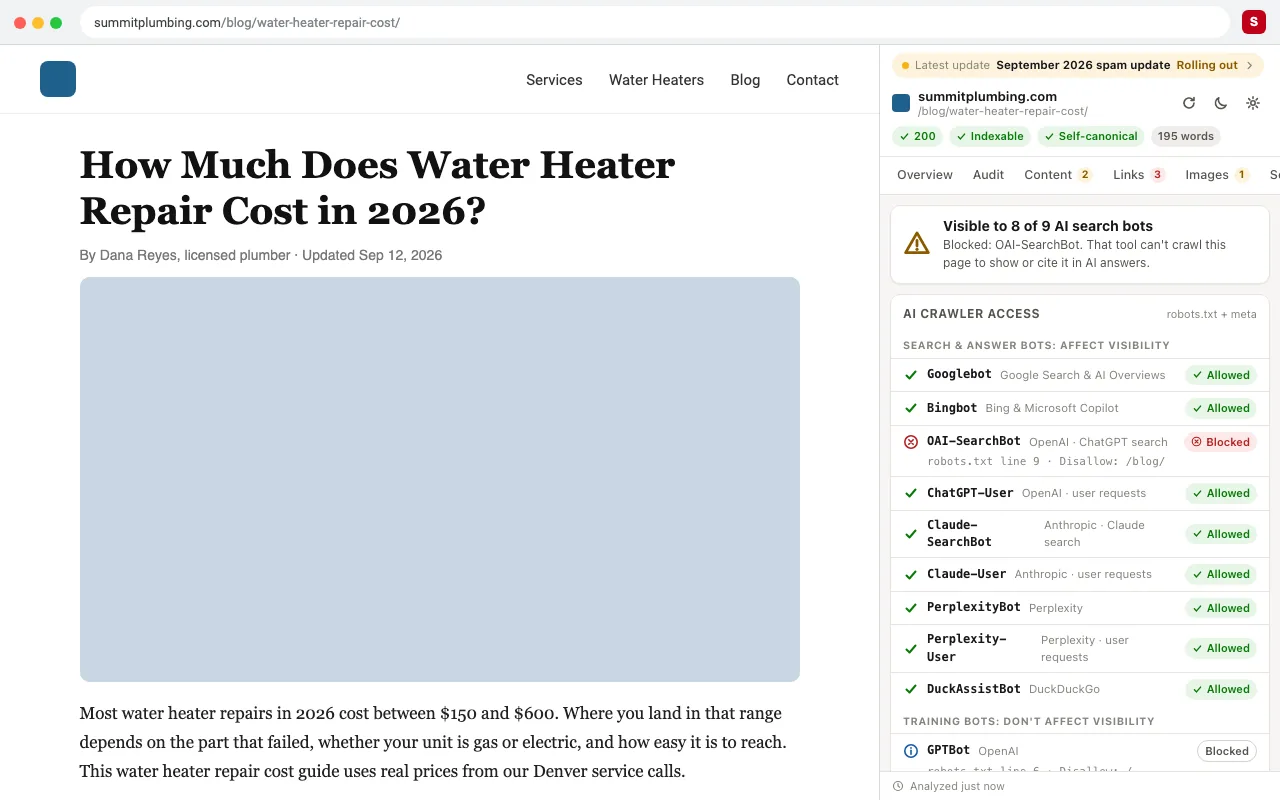
See whether AI crawlers from OpenAI, Anthropic, Perplexity, Google, Bing, Apple and Meta can reach the page. AI search bots are kept separate from training bots. It also checks for llms.txt and how much of your content still loads without JavaScript.
LCP, INP and CLS from the Chrome UX Report (field data, not a lab test) for mobile or desktop. You get a 25-week trend and the split of good, needs-improvement and poor visits.
Connect Search Console (free and read-only) to see clicks, impressions, CTR, position and top queries for the exact URL you're viewing. You also get index status from Google's URL Inspection, and Google updates are marked on the trend.
SEO ToolBox remembers each page. When you come back, it shows what changed: title, description, robots, canonical, headings, schema and more. You get a red alert if a page suddenly becomes noindex.
Missing alt text, oversized and legacy-format images, all with an on-page overlay. Convert any image to WebP in one click.
Also included: keyword density for 1–3 word phrases, a Google algorithm update tracker, heading and nofollow overlays, CSV export, light and dark mode, and a tab layout you can reorder.
Add it to Chrome. It's free and takes one click. No account or sign-up.
Open any page and click the SEO ToolBox icon. The side panel opens and analyzes the page in about a second.
Fix what matters first. Start with the top issues, then go deeper in each tab. The panel follows you from tab to tab and page to page.
There are great SEO extensions out there, and many SEOs run two or three. Here's an honest look at what each one covers, so you can pick the right mix.
| Feature | SEO ToolBox | Detailed SEO | SEO META in 1 CLICK | SEOquake | MozBar | Ahrefs SEO Toolbar | SEO Pro |
|---|---|---|---|---|---|---|---|
| Price | Free, no account | Free | Free | Free (free Semrush account adds more) | Free account; Pro is $ | Free core; metrics $ | Free |
| Stays open in the side panel as you browse | Listed | Not listed | Not listed | Not listed | Not listed | Not listed | Not listed |
| Page health score with prioritized issues | Listed | Not listed | Not listed | Listed | Partial:Pro ($) | Not listed | Not listed |
| Meta tags, canonical and meta robots | Listed | Listed | Listed | Listed | Partial | Listed | Listed |
| Heading outline (H1–H6) | Listed | Listed | Listed | Listed | Partial | Listed | Listed |
| Open Graph and Twitter tags | Listed | Not listed | Listed | Not listed | Not listed | Not listed | Listed |
| Broken link check with live status codes | Listed | Not listed | Partial:counts only | Listed | Partial:categorizes | Listed | Partial |
| Redirect chains (301/302 hop by hop) | Listed | Not listed | Not listed | Not listed | Not listed | Listed | Listed |
| Schema: validated against Google rich result rules | Listed | Partial:view | Partial:via external tool | Partial:checks | Partial:audit | Not listed | Partial:view |
| robots.txt tester (shows the blocking rule) | Listed | Partial:X-Robots | Partial:link to file | Partial:directives | Partial:audit | Partial:directives | Partial:meta robots |
| hreflang | Listed | Listed | Not listed | Listed | Listed | Not listed | Not listed |
| AI crawler access (GPTBot, ClaudeBot, PerplexityBot…) and llms.txt | Listed | Not listed | Not listed | Partial:AI Overview sources | Not listed | Not listed | Not listed |
| Core Web Vitals from real users (CrUX) with trend | Listed | Not listed | Partial:PageSpeed link | Not listed | Not listed | Partial:PageSpeed | Partial:CWV metrics |
| Google Search Console data for the current page | Listed | Not listed | Not listed | Not listed | Not listed | Not listed | Not listed |
| Change tracking between visits | Listed | Not listed | Not listed | Not listed | Not listed | Not listed | Not listed |
| Keyword density | Listed | Not listed | Not listed | Listed | Not listed | Not listed | Partial:word count |
| Keyword and SEO metrics in Google results (SERP overlay) | Not listed | Partial:PAA export | Not listed | Listed | Listed | $ needs a paid plan | Not listed |
| Domain and backlink metrics | Partial:your own DataForSEO account | Not listed | Not listed | Listed | Listed | $ needs a paid plan | Not listed |
| Last updated | Sep 2026 | Jun 2026 | Aug 2024 | Sep 2026 | Sep 2026 | Sep 2026 | Nov 2024 |
Based on each extension's Chrome Web Store listing and official product page as of September 29, 2026. “—” means the feature isn't listed, not that it's impossible. Spotted something out of date? Tell us at info@redseo.io and we'll fix it.
Where others are the better pick: if you want keyword volumes and metrics inside Google's results, use Keywords Everywhere or SEOquake. If you want Domain Authority or Ahrefs backlink metrics at a glance, use MozBar or the Ahrefs toolbar. SEO ToolBox is built for the page itself: auditing it, validating it, and seeing how it performs.
Add to Chrome, it's freeAn SEO Chrome extension is a browser add-on that checks a web page's search engine optimization while you view it. It reads things like the title tag, meta description, headings, links, images and structured data, so you can spot problems without opening a separate SEO tool or reading the page's source code.
SEO agencies and consultants: audit client pages in seconds and export findings.
In-house SEO and marketing teams: catch problems after every release with change tracking.
Content writers and editors: check titles, descriptions, headings and alt text before publishing.
Developers: verify canonicals, redirects, robots rules and structured data without digging through source.
SEO ToolBox analyzes pages inside your browser. Page snapshots, history and settings are stored locally and never uploaded to our servers. No account is needed. Search Console and DataForSEO are optional and connect to your own accounts. Anonymous usage statistics are off unless you choose to share them.
Read the privacy policyGoogle Search Console Free
Clicks, impressions, queries and index status for the current page. Read-only.
DataForSEO Your own account, pay as you go
Keyword rankings, backlinks, AI mentions and live Google results for the page you're on. You set a monthly spending limit, and cached results cost nothing to reopen.
It depends on the job. For on-page audits, a free extension that validates as well as displays tags is most useful: SEO ToolBox covers meta tags, schema validation, broken links, robots.txt, AI crawlers and Core Web Vitals in one side panel. For keyword volumes inside Google results, Keywords Everywhere and SEOquake are popular. For backlink and authority metrics, the MozBar and Ahrefs toolbars are the usual choices.
Yes. Every audit feature is free with no account and no usage limits. The only optional cost is DataForSEO, which uses your own DataForSEO account for rankings and backlink data, with a spending limit you control.
Yes. Google Search Console shows how your site performs in search, PageSpeed Insights measures speed, and the Rich Results Test checks structured data. SEO ToolBox brings Search Console data and real-user Core Web Vitals into the page you're viewing, and validates structured data against the same rich result rules.
Yes, several. Detailed SEO Extension and SEO META in 1 CLICK give a quick view of a page's tags. SEO ToolBox goes deeper, with a health score, a full audit, live link and redirect checks, schema validation, AI crawler access, Core Web Vitals field data and change tracking.
Open the page and click SEO ToolBox. The header shows whether the page is indexable, based on its meta robots tag, the X-Robots-Tag header and robots.txt together. If robots.txt blocks Googlebot, it shows the exact rule responsible.
Open the Schema tab. SEO ToolBox lists every JSON-LD and microdata item on the page and checks each one against Google's rich result requirements. It flags missing required properties and explains how to fix them.
Yes. The AI tab reads the site's robots.txt and shows which AI crawlers from OpenAI, Anthropic, Perplexity, Google, Bing, Apple and Meta are allowed or blocked. It keeps AI search bots, which affect visibility, separate from training bots. It also checks for llms.txt.
It reads the page you're viewing, and requests that site's public files (robots.txt, sitemap, llms.txt and link URLs) to run its checks. It doesn't need an account, doesn't sell data, and keeps your history on your computer. Search Console access is read-only and optional.
SEO ToolBox runs in Chromium browsers such as Edge and Brave. Search Console sign-in currently needs Google Chrome.
No. Those crawl whole sites and research the wider web. SEO ToolBox is for the page in front of you, and makes the everyday checks instant. Many teams use both.
Add SEO ToolBox to Chrome and audit your next page in seconds.
Add to Chrome, it's freeFree · No account · Made by RedSEO